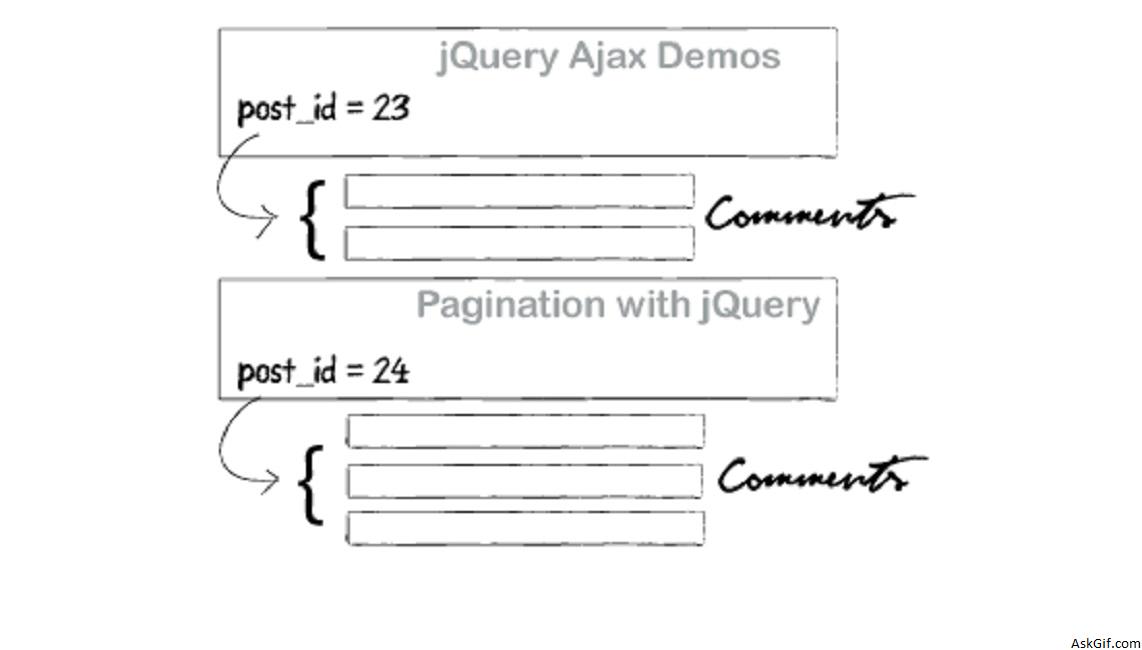
Most of the readers commented about displaying existing(old) comments and database design. So in this post, I had updated the old code. This post very well explains how to implement a comment system with Jquery.
Database Design
Relationship between posts and comments table.
//Posts Table
CREATE TABLE posts
(
post_id INT PRIMARY KEY AUTO_INCREMENT,
post_title VARCHAR(200),
post_dis TEXT
);

//Comments Table
CREATE TABLE comments
(
com_id INT PRIMARY KEY AUTO_INCREMENT,
com_name VARCHAR(100),
com_email VARCHAR(100),
com_dis TEXT,
post_id_fk INT,
FOREIGN KEY(post_id_fk) REFERENCES posts(post_id)
);
javascript code.
Contains javascript.
<script type="text/javascript" src="jquery.js"></script>
<script type="text/javascript" >
$(function() {
$(".submit").click(function()
{
var name = $("#name").val();
var email = $("#email").val();
var comment = $("#comment").val();
var post_id = $("#post").val();
var dataString = 'name='+ name + '&email=' + email + '&comment=' + comment+ '&post_id=' + post_id;
if(name=='' || email=='' || comment=='')
{
alert('Please Give Valid Details');
}
else
{
$("#flash").show();
$("#flash").fadeIn(400).html('<img src="ajax-loader.gif" />Loading Comment...');
$.ajax({
type: "POST",
url: "commentajax.php",
data: dataString,
cache: false,
success: function(html){
$("ol#update").append(html);
$("ol#update li:last").fadeIn("slow");
$("#flash").hide();
}
});
}return false;
}); });
</script>
comment.php
Contains HTML code here class timeline li{display:none}
<ol id="update" class="timeline">
<?php
include('config.php');
//$post_id value comes from the POSTS table
$sql=mysql_query("select * from comments where post_id_fk='$post_id'");
while($row=mysql_fetch_array($sql))
{
$name=$row['com_name'];
$email=$row['com_email'];
$comment_dis=$row['com_dis'];
$lowercase = strtolower($email);
$image = md5( $lowercase );
?>
//Displaying existing or old comments
<li class="box">
<img src="http://www.gravatar.com/avatar.php?gravatar_id=<?php echo $image; ?>" class="com_img">
<span class="com_name"> <?php echo $name; ?></span> <br />
<?php echo $comment_dis; ?></li>
<?php
}
?>
</ol>
<div id="flash"></div>
<div >
<form action="#" method="post">
<input type="hidden" id="name" value="<?php echo $post_id; ?>"/>
<input type="text" id="name"/>Name<br />
<input type="text" id="email"/>Email<br />
<textarea id="comment"></textarea><br />
<input type="submit" class="submit" value=" Submit Comment " />
</form>
</div>
commentajax.php
Contains PHP and HTML code.
<?php
if($_POST)
{
$name=$_POST['name'];
$name=mysql_real_escape_string($name);
$email=$_POST['email'];
$email=mysql_real_escape_string($email);
$comment=$_POST['comment'];
$comment=mysql_real_escape_string($comment);
$post_id=$_POST['post_id'];
$post_id=mysql_real_escape_string($post_id);
$lowercase = strtolower($email);
$image = md5( $lowercase );
mysql_query("insert into comment(com_name,come_email,com_dis) values ('$name','$email','$comment_dis','$post_id')");
}

?>

<li class="box">
<img src="http://www.gravatar.com/avatar.php?gravatar_id=
<?php echo $image; ?>"/>
<?php echo $name;?><br />
<?php echo $comment; ?>
</li>