Loading Javascript Files using Jquery.
💻 coding

Loading Javascript Files using Jquery.

1 min read 91 words
1 min read
ShareWhatsAppPost on X
  • 1Loading JavaScript files with jQuery can improve page loading times by only loading files when needed.
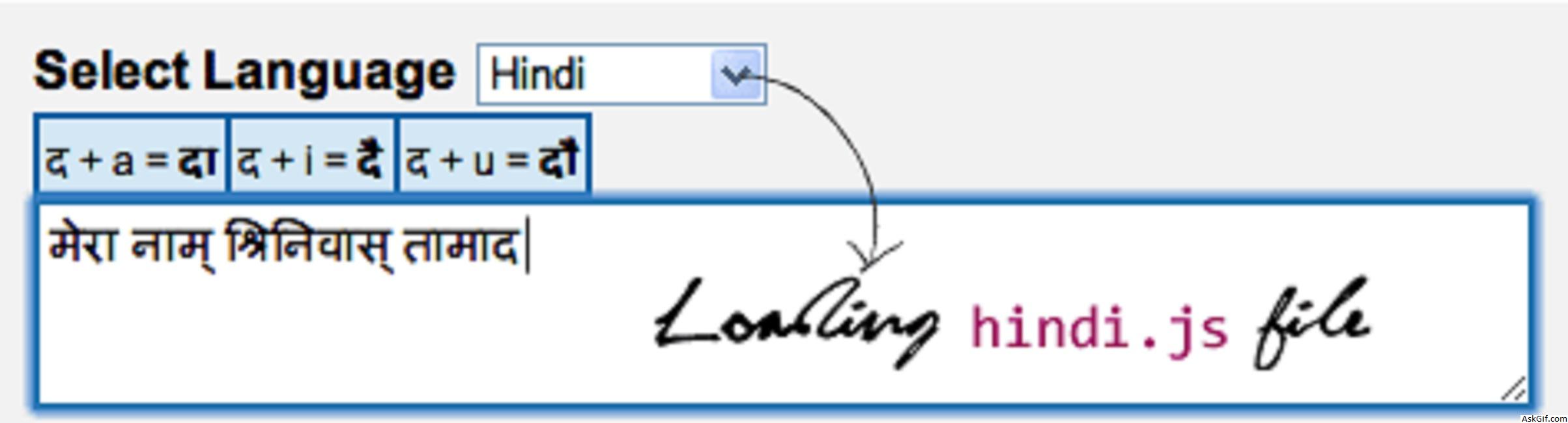
  • 2The provided script demonstrates how to load different JavaScript files based on user selection from a dropdown menu.
  • 3Using AJAX to load scripts dynamically enhances user experience by reducing initial load times.

AI-generated summary · May not capture all nuances

Key Insight
AskGif

"Loading JavaScript files with jQuery can improve page loading times by only loading files when needed."

Loading Javascript Files using Jquery.

In this post, I want to explain loading javascript files with jquery. Here demo regional language textbox contains many javascript files, so just loading files with jquery when the file required. It's useful to faster your page loading time.

Sample Script

<script type="text/javascript" src="http://ajax.googleapis.com/
ajax/libs/jquery/1.4.2/jquery.min.js"></script>
<script type="text/javascript">
$(function() 
{
$(".language").change(function(){
var id = $(this).attr("value");

if(id == 'hindi')
{
$.ajax({
type: "GET",
url: "hindi.js",
dataType: "script"
}); 
}

else
{
$.ajax({
type: "GET",
url: "telugu.js",
dataType: "script"
}); 
}

return false;
});
});
</script>
<select class="language"> 
<option value="hindi" >Hindi</option> 
<option value="telugu">Telugu</option> 
</select>

Enjoyed this article?

Share it with someone who'd find it useful.

ShareWhatsAppPost on X

AskGif

Published on 20 September 2019 · 1 min read · 91 words

Part of AskGif Blog · coding

You might also like



