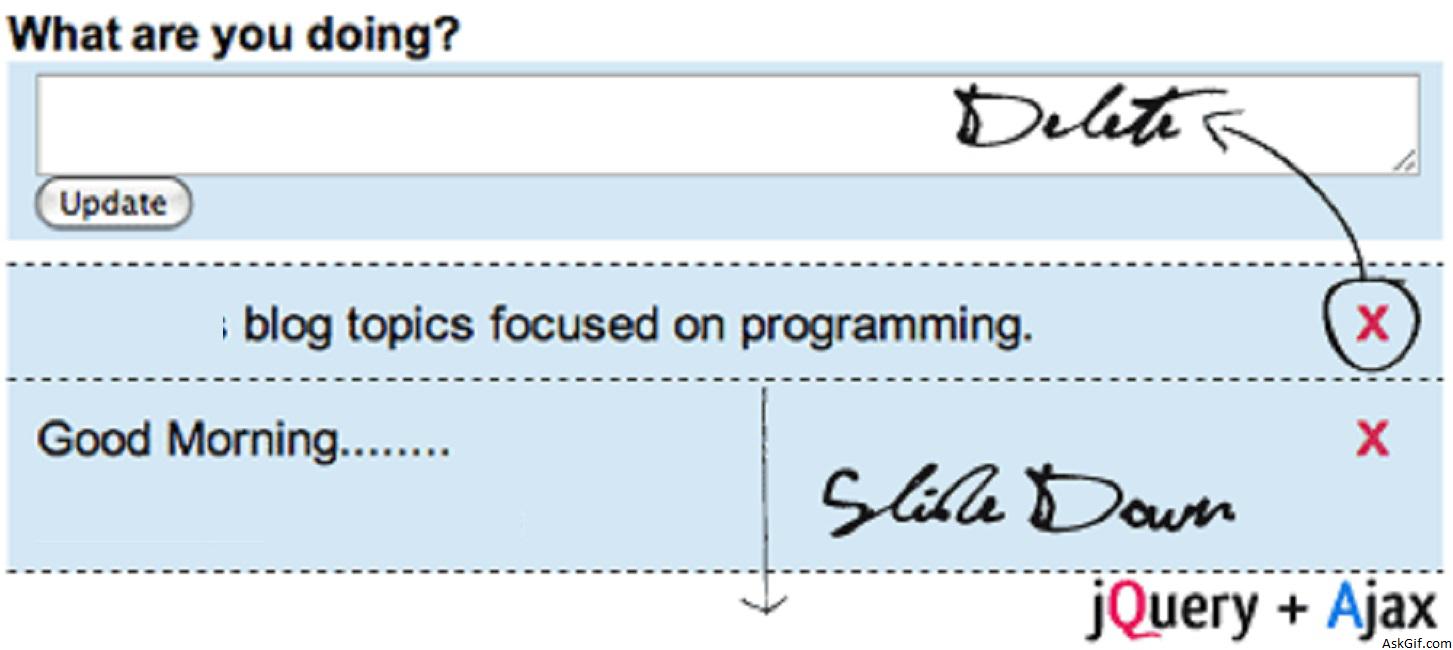
Some days back I had posted popular articles Insert a Record with animation effect. and Delete Records with Random Animation Effect using jquery and ajax. I received a lot of requests from my readers that asked to me how to combine both scripts. So I had developed a tutorial Live update and delete records with animation effect using jquery and ajax implementing live() jquery event.
Database Table Details:
CREATE TABLE messages(
msg_id INT AUTO_INCREMENT PRIMARY KEY,
msg TEXT
);
update_delete.php
Contains javascript and HTML code update button with class "update_button" and textarea with id "content". When a user click update button the new message is display to top of the ol timeline list with an id "update" with an animated slide Down effect with jQuery and Ajax.
If you want fadeIn and fadeOut effect just replace the word "slideDown" to "fadeIn" and "slideUp" to "fadeOut" in this following script.
<script type="text/javascript" src="http://ajax.googleapis.com/ajax/
libs/jquery/1.3.0/jquery.min.js">
</script>
<script type="text/javascript" >
$(function() {
//Update Message...
$(".update_button").click(function() {
var boxval = $("#content").val();
var dataString = 'content='+ boxval;
if(boxval=='')
{
alert("Please Enter Some Text");
}
else
{
$("#flash").show();
$("#flash").fadeIn(400).html('<img src="ajax-loader.gif" align="absmiddle"> <span class="loading">Loading Comment...</span>');
$.ajax({
type: "POST",
url: "update_data.php",
data: dataString,
cache: false,
success: function(html){
$("ol#update").prepend(html);
$("ol#update li:first").slideDown("slow");
document.getElementById('content').value='';
document.getElementById('content').focus();
$("#flash").hide();
}
});
} return false;
});
//Delete Message..
$('.delete_update').live("click",function()
{
var ID = $(this).attr("id");
var dataString = 'msg_id='+ ID;
if(confirm("Sure you want to delete this update? There is NO undo!"))
{
$.ajax({
type: "POST",
url: "delete_data.php",
data: dataString,
cache: false,
success: function(html){
$(".bar"+ID).slideUp('slow', function() {$(this).remove();});
}
});
}
return false;
});
});
</script>
// HTML code
<div>
<form method="post" name="form" action="">
<h3>What are you doing?</h3>
<textarea name="content" id="content" maxlength="145" >
</textarea><br />
<input type="submit" value="Update" name="submit" class="update_button"/>
</form>
</div>
<div id="flash"></div>
<ol id="update" class="timeline">
</ol>
<div id='old_updates'>
// Display old updates form messages table.
</div>update_data.php
Contains simple PHP Code displays recently inserted record details from the database
<?php
include('db.php');
if(isSet($_POST['content']))
{
$content=$_POST['content'];
mysql_query("insert into messages(msg) values ('$content')");
$sql_in= mysql_query("SELECT msg,msg_id FROM messages order by msg_id desc");
$r=mysql_fetch_array($sql_in);
$msg=$r['msg'];
$msg_id=$r['msg_id'];
}

?>
<li class="bar<?php echo $msg_id; ?<">
<div align="left">
<span ><?php echo $msg; ?> </span>
<span class="delete_button"><a href="#" id="<?php echo $msg_id; ?>" class="delete_update">X</a></span>

</div>
</li>
delete_data.php
Contains PHP code. Delete record from the database.
<?php
include("db.php");
if($_POST['msg_id'])
{
$id=$_POST['msg_id'];
$id = mysql_escape_String($id);
$sql = "delete from messages where msg_id='$id'";
mysql_query( $sql);
}
?>
CSS Code
*{margin:0;padding:0;}
ol.timeline{
list-style:none;font-size:1.2em;
}
ol.timeline li{
display:none;position:relative;
padding:.7em 0 .6em 0;
border-bottom:1px dashed #000;
line-height:1.1em;
background-color:#D3E7F5;
height:55px;
width:499px;}
ol.timeline li:first-child{
border-top:1px dashed #000;}





