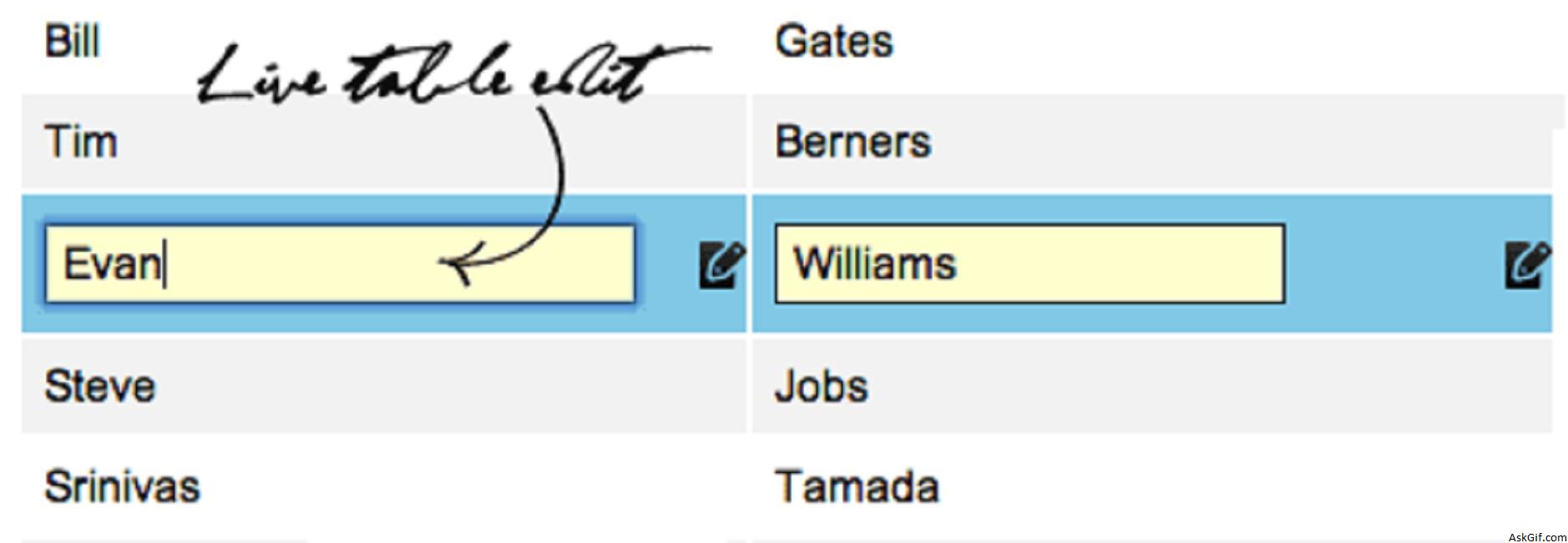
I love Jquery framework, feels that we can do awesome things. Let’s take a look at how to implement live table edit with Jquery and real-time database update using Ajax. This is an interesting concept playing with DOM objects. You know that the majority of readers had requested this tutorial, hope you guys like it!
Database
Sample database fullnames table columns id, firstname and lastname.
CREATE TABLE fullnames
(
id INT PRIMARY KEY AUTO_INCREMENT,
firstname VARCHAR(70),
lastname VARCHAR(70)
);
TableEdit.php
Displaying records from fullnames table. Take a look at above wire-frame image.
//Table Records
<table>
<?php
include('db.php');
$sql=mysql_query("select * from fullnames");
while($row=mysql_fetch_array($sql))
{
$id=$row['id'];
$firstname=$row['firstname'];
$lastname=$row['lastname'];
?>
<tr id="<?php echo $id; ?>" class="edit_tr">
<td class="edit_td">
<span id="first_<?php echo $id; ?>" class="text"><?php echo $firstname; ?></span>
<input type="text" value="<?php echo $firstname; ?>" class="editbox" id="first_input_<?php echo $id; ?>" />
</td>
<td class="edit_td">
<span id="last_<?php echo $id; ?>" class="text"><?php echo $lastname; ?></span>
<input type="text" value="<?php echo $lastname; ?>" class="editbox" id="last_input_<?php echo $id; ?>"/>
</td>
</tr>
<?php
}
?>
</table>Javascript Code
Contains javascipt code. $(".edit_tr").click(function(){}- edit_tr is the CLASS name of TR tag. Using $(this).attr("id") calling TR tag ID value. $(".edit_tr").change(function(){} sending the ajax request to table_edit_ajax.php
<script type="text/javascript" src="http://ajax.googleapis.com/
ajax/libs/jquery/1.5/jquery.min.js"></script>
<script type="text/javascript">
$(document).ready(function()
{
$(".edit_tr").click(function()
{
var ID=$(this).attr('id');
$("#first_"+ID).hide();
$("#last_"+ID).hide();
$("#first_input_"+ID).show();
$("#last_input_"+ID).show();
}).change(function()
{
var ID=$(this).attr('id');
var first=$("#first_input_"+ID).val();
var last=$("#last_input_"+ID).val();
var dataString = 'id='+ ID +'&firstname='+first+'&lastname='+last;
$("#first_"+ID).html('<img src="load.gif" />'); // Loading image

if(first.length>0&& last.length>0)
{

$.ajax({
type: "POST",
url: "table_edit_ajax.php",
data: dataString,
cache: false,
success: function(html)
{
$("#first_"+ID).html(first);
$("#last_"+ID).html(last);
}
});
}
else
{
alert('Enter something.');
}

});

// Edit input box click action
$(".editbox").mouseup(function()
{
return false
});

// Outside click action
$(document).mouseup(function()
{
$(".editbox").hide();
$(".text").show();
});

});
</script>
table_edit_ajax.php
Simple PHP code, updating fullnames tables records.
<?php
include("db.php");
if($_POST['id'])
{
$id=mysql_escape_String($_POST['id']);
$firstname=mysql_escape_String($_POST['firstname']);
$lastname=mysql_escape_String($_POST['lastname']);
$sql = "update fullnames set firstname='$firstname',lastname='$lastname' where id='$id'";
mysql_query($sql);
}
?>
db.php
PHP database configuration file
<?php

$mysql_hostname = "Host name";
$mysql_user = "UserName";
$mysql_password = "Password";
$mysql_database = "Database Name";
$bd = mysql_connect($mysql_hostname, $mysql_user, $mysql_password) or die("Could not connect database");
mysql_select_db($mysql_database, $bd) or die("Could not select database");
?>
CSS Code
Styles for TableEdit.php
body
{
font-family:Arial, Helvetica, sans-serif;
font-size:14px;
}
.editbox
{
display:none
}
td
{
padding:5px;
}
.editbox
{
font-size:14px;
width:270px;
background-color:#ffffcc;
border:solid 1px #000;
padding:4px;
}
.edit_tr:hover
{
background:url(edit.png) right no-repeat #80C8E5;
cursor:pointer;
}





