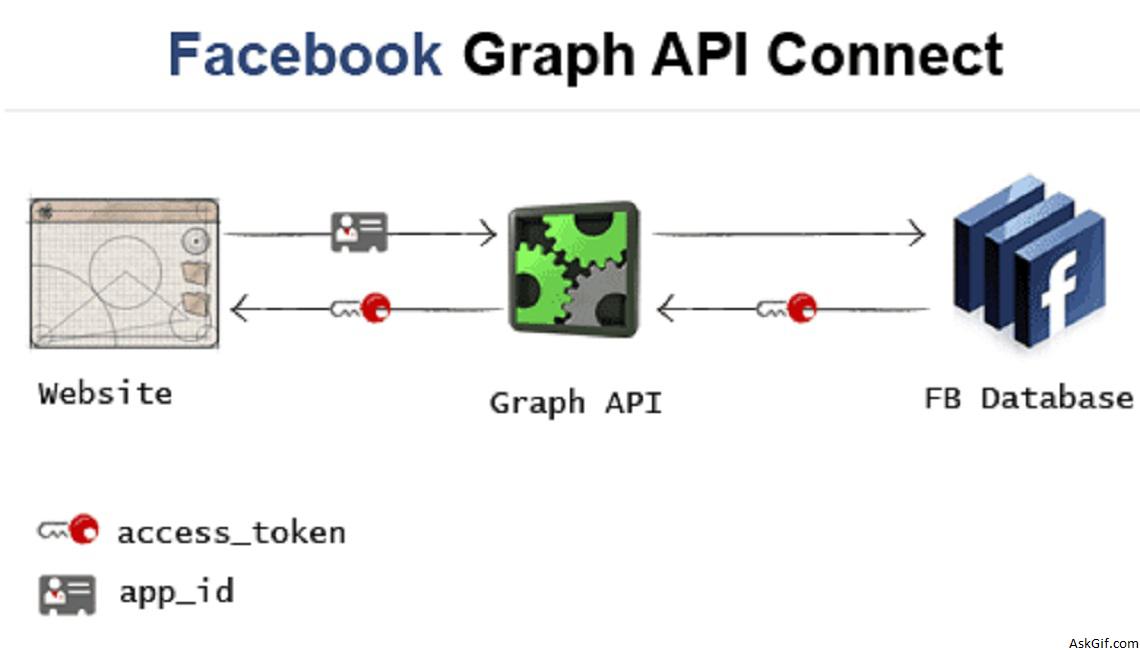
This post I had presented in an easy way to connect and read the Facebook home timeline with PHP and Jquery. Explained how to store facebook token and user id hope you like it.
Database
Sample database table here storing facebook access token key and profile id. MySQL users table columns uid, uname, passcode, facebook_id and facebook_access_token
CREATE TABLE users
(
uid INT PRIMARY KEY AUTO_INCREMENT,
username VARCHAR(50) UNIQUE,
passcode VARCHAR(50),
facebook_id VARCHAR(100),
facebook_access_token TEXT
);
Connecting Facebook
You have to create a facebook application. It will provide application_id and application_secret. While clicking Add Facebook anchor tag URL requesting Facebook Graph API with contains your web project redirection URL.
<a href="https://graph.facebook.com/oauth/authorize?type=user_agent&client_id=APP_ID
&redirect_uri=http://yourwebsite.com/fbaccess.php
&scope=user_photos,user_videos,email,user_birthday,
offline_access,publish_stream,status_update">
Add Facebook
</a>
Fbaccess.php
Redirecting file contains PHP code. Here you have to include facebook.php (Facebook library file) to getting the access token values. Updating users table where username=$user_session (login user).
<?php
# We require the library
require("facebook.php");
require("db.php");
# Creating the facebook object
$facebook = new Facebook(array(
'appId' => 'APP_ID',
'secret' => 'APP_SECRET_ID',
'cookie' => true
));
# Let's see if we have an active session
$session = $facebook->getSession();
if(!empty($session))
{
try
{
$facebook_id = $session['uid'];
$facebook_access_token=$session['access_token'];
// Updating Facebook values into Users table
mysql_query("UPDATE users SET facebook_uid='$facebook_id', facebook_access_token='$facebook_access_token' WHERE username='$user_session'");
header("Location: http://yourwebsite.com/home.php");
}
catch (Exception $e){}
}
else
{
header("Location: http://yourwebsite.com/home.php");
}
Home.php
Contains HTML, Javascript, and PHP code. Here using .getJSON to requesting Facebook Graph API home timeline with access_token and app_id.
<?php
include('db.php');
$sql=mysql_query("select facebook_id,facebook_access_token from users where username='$user_session'");
$row=mysql_fetch_array($sql);
$facebook_id=$row['facebook_id'];
$facebook_access_token=$row['facebook_access_token'];
?>
// Javascript Code-------------------------------------
<script type="text/javascript" src="http://ajax.googleapis.com/
ajax/libs/jquery/1.4.2/jquery.min.js"></script>
<script type="text/javascript">
$(function()
{
$(".facebook").click(function()
{
var URL = 'https://graph.facebook.com/<?php echo $facebook_id; ?>/home?access_token=<?php echo $facebook_token; ?>&expires_in=0&callback=?';
$.getJSON(URL,function(data)
{
$.each(data.data, function(i,data)
{
var picture = 'http://graph.facebook.com/'+data.from.id+'/picture';
// If no message
if(data.message)
{
var msg=data.message;
}
else
{
var msg=data.name;
}
var div_data ="<div class='fb_status'><img src="+picture+" class='fb_image'/><a href='' ><b>"+data.from.name+"</b></a> "+msg+"</div>";
$(div_data).appendTo("#facebookdata");

});
});
</script>
// HTML Code---------------------------------------------
<?php
if($facebook_uid)
{
?>
<a href="#" class="facebook" >Connected</a>
<?php
} else {
?>
<a href="https://graph.facebook.com/oauth/authorize?type=user_agent&client_id=APP_ID
&redirect_uri=http://yourwebsite.com/fbaccess.php
&scope=user_photos,user_videos,email,user_birthday,
offline_access,publish_stream,status_update">
Add Facebook
</a>
<?php
}
?>
<div id='facebookdata'></div>
CSS Code
.fb_status
{
min-height:60px;
padding:6px;
border-bottom:solid 1px #DEDEDE
}
.fb_status a
{
color:#3cf;
text-decoration:none
}
.fb_status a:hover{
color:#3cf;
text-decoration:underline
}
.fb_image{
float:left;
margin-right:14px;
width:50px;
height:50px;
padding:3px;
}
db.php
PHP database configuration file
<?php

$mysql_hostname = "Host name";
$mysql_user = "UserName";
$mysql_password = "Password";
$mysql_database = "Database Name";
$bd = mysql_connect($mysql_hostname, $mysql_user, $mysql_password) or die("Could not connect database");
mysql_select_db($mysql_database, $bd) or die("Could not select database");
?>





