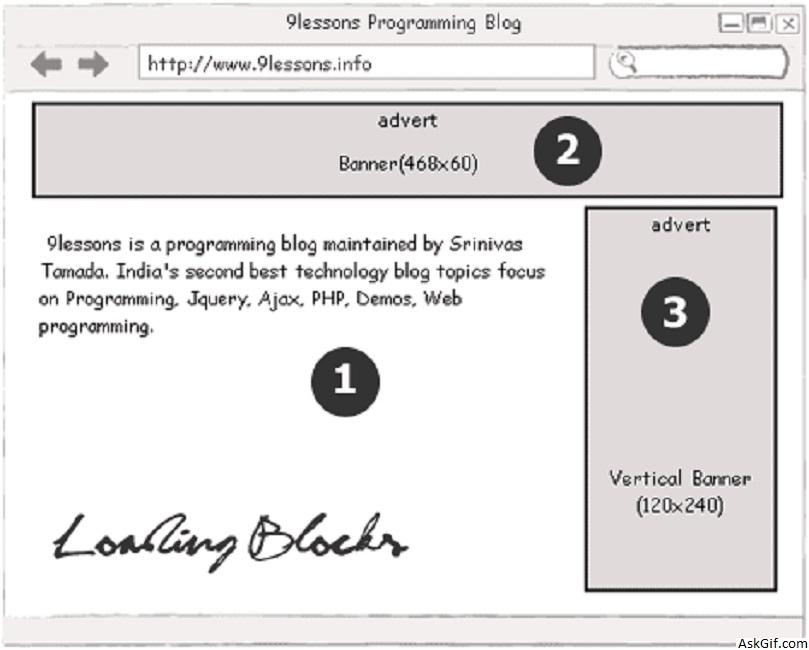
Banner advertisements eating your web page loading time? Take a look at this post. how to display advertisiment blocks after loading the main content block with jquery. It is very simple ajax implementation with jquery. Use it increase your web project loading speed.
Content block loading first then Topbanner finally Sidebanner
Javascript Code
Contains javascript code. Using jquery ajax function.
<script type="text/javascript" src="http://ajax.googleapis.com/
ajax/libs/jquery/1.4.2/jquery.min.js"></script>
<script type="text/javascript">
$(document).ready(function()
{
content(); // 1 content block
topbanner(); // 2 top banner
sidebanner(); // 3 side banner

//Content Block
function content()
{
$.ajax({
type: "POST",
url: "content.php", //Content Page
data: "" ,
beforeSend: function()
{
$("div#content").html('<span class="loading">Loading...</span>');
},
cache: false,
success: function(data)
{
$("#content").html(data);
}
});
}

//Top Banner Block
function topbanner()
{
$.ajax({
type: "POST",
url: "topbanner.php", //Top banner File
data: "" ,
beforeSend: function()
{
$("div#topbanner").html('<span class="loading">Loading...</span>');
},
cache: false,
success: function(data)
{
$("#topbanner").html(data);
}
});
}
//Side banner funtion same like topbanner.

});
</script>

//HTML Code

<div id="main">
<div id="topbanner"></div>
<div id="content"></div>
<div id="sidebanner"></div>
</div>
topbanner.php
Contains PHP and HTML code
<?php
echo '<a href=""><IMG src="topbanner.png" /></a>';
?>
CSS Code
#main
{
width:900px; border:solid 2px #dedede; margin-top:30px; height:600px
}
#topbanner
{
height:100px; border-bottom:solid 2px #dedede
}
#content
{
float:left;width:750px; height:498px
}
#sidebanner
{
float:left;width:148px; height:498px;border-left:solid 2px #dedede
}
.loading
{
color:#cc0000;
}





