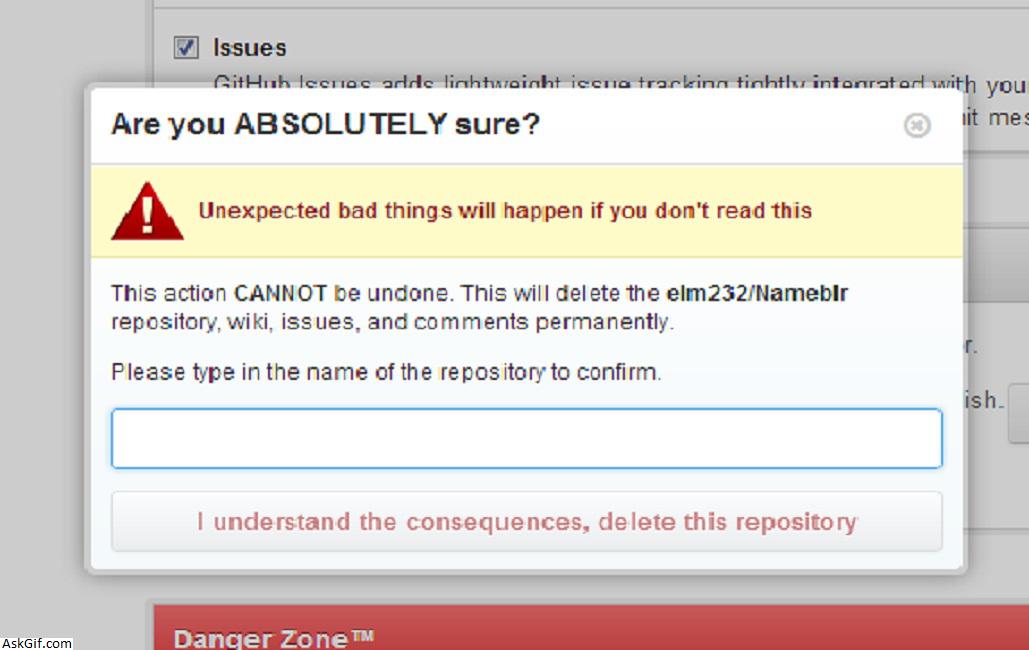
Github has a pretty nice UX for deleting repositories. When you click “Delete”, you aren’t presented with a typical “Are you sure? Yes/No” alert. Instead, you are shown a modal with an in-your-face warning telling you the reprocussions of completing the modal, followed by a text input requiring you to enter a specific value before continuing.
I think this is pretty great for this case. Not all Delete actions warrant this, but some do. So, I created an AngularJS directive to provide this. Feel free to use it, but keep in mind it does require AngularUI Bootstrap (note the $modal dependency).
The directive:
app.directive("confirmByTyping", ["$modal", function ($modal) {
 var getConfirmTypingModalTemplate = function (title, message) {
 var modalTemplate = "<div class=\"modal-header\"> " +
 "<h3 class=\"modal-title\">" + title + "</h3> " +
 "</div> " +
 "<div class=\"modal-body\"> " + message +
 "<div class=\"form-group\" ng-class=\"{ 'has-success': confirmInput === expectedInput, 'has-error': confirmInput !== expectedInput }\">" +
 "<input class=\"form-control\" auto-focus ng-model=\"confirmInput\" ng-keydown=\"$event.which === 13 && closeConfirmTypingModal(true)\">" +
 "</div>" +
 "</div> " +
 "<div class=\"modal-footer modal-footer-buttons\"> " +
 "<button class=\"btn btn-primary\" type=\"button\" ng-click=\"closeConfirmTypingModal(true)\" ng-disabled=\"confirmInput !== expectedInput\">OK</button> " +
 "<button class=\"btn btn-danger\" type=\"button\" ng-click=\"closeConfirmTypingModal()\">Cancel</button> " +
 "</div>";

 return modalTemplate;
 }

 var getConfirmAlertModalTemplate = function (message) {
 var modalTemplate = "<div class=\"modal-body\"> " + message + "</div> " +
 "<div class=\"modal-footer modal-footer-buttons\"> " +
 "<button class=\"btn btn-primary\" type=\"button\" ng-click=\"closeConfirmAlertModal(true)\">Yes</button> " +
 "<button class=\"btn btn-danger\" type=\"button\" ng-click=\"closeConfirmAlertModal()\">No</button> " +
 "</div>";

 return modalTemplate;
 }

 return {
 restrict: "A",
 scope: {
 confirmAction: "&"
 },
 link: function (scope, element, attrs) {
 element.bind("click", function ($event) {
 $event.target.blur();

 var message = attrs.modalMessage,
 title = attrs.modalTitle,
 value = attrs.confirmValue;

 var confirmTypingModal = function() {
 $modal.open({
 backdrop: "static",
 template: getConfirmTypingModalTemplate(title, message),
 controller: ["$scope", "$modalInstance", function($scope, $modalInstance) {
 $scope.expectedInput = value;
 $scope.confirmInput = "";

 $scope.closeConfirmTypingModal = function (confirmed) {
 if (confirmed) {
 if ($scope.expectedInput !== $scope.confirmInput) {
 return;
 }

 scope.confirmAction();
 }
 $modalInstance.close();
 };
 }
 ]
 });
 };

 $modal.open({
 backdrop: "static",
 template: getConfirmAlertModalTemplate(title, message),
 controller: ["$scope", "$modalInstance", function ($scope, $modalInstance) {
 $scope.closeConfirmAlertModal = function (confirmed) {
 $modalInstance.close();

 if (confirmed) {
 confirmTypingModal();
 }
 };
 }]
 });
 });
 }
 }
}]);
Example use:
<button confirm-by-typing confirm-action="deleteSite(site)" confirm-value="{{site.Path}}" alert-message="Are you sure you want to delete '{{site.Name}}'?" modal-title="Are you sure you want to delete '{{site.Name}}'?" modal-message="Enter the site path <strong>'{{site.Path}}'</strong> below to confirm.">
 Delete
</button>





