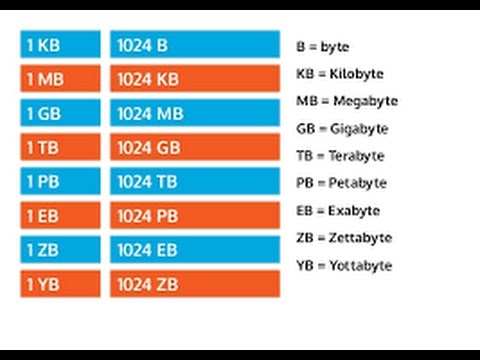
मैं केबी, एमबी, जीबी आदि में उपलब्ध बाइट्स में उपलब्ध बाइट्स कैसे परिवर्तित कर सकता हूं?
💻 coding

मैं केबी, एमबी, जीबी आदि में उपलब्ध बाइट्स में उपलब्ध बाइट्स कैसे परिवर्तित कर सकता हूं?

1 min read 107 words
1 min read
ShareWhatsAppPost on X
  • 1To convert bytes to KB, MB, GB, etc., use the provided function that calculates total bytes in different units.
  • 2The function uses an array of suffixes to represent different byte units from bytes to exabytes.
  • 3It handles zero bytes and calculates the appropriate unit based on logarithmic conversion.

AI-generated summary · May not capture all nuances

Key Insight
AskGif

"To convert bytes to KB, MB, GB, etc., use the provided function that calculates total bytes in different units."

मैं केबी, एमबी, जीबी आदि में उपलब्ध बाइट्स में उपलब्ध बाइट्स कैसे परिवर्तित कर सकता हूं?

How to calculate total bytes available in particular folder and I want to convert the total bytes available to total bytes available in KB, MB, GB etc?

if you are calculating total bytes then you can use the following function to find out the respective total bytes in KB, MB, GB, TB etc.

static String BytesToString(long byteCount)
 {
 string[] suf = { "B", "KB", "MB", "GB", "TB", "PB", "EB" }; //Longs run out around EB
 if (byteCount == 0)
 return "0" + suf[0];
 long bytes = Math.Abs(byteCount);
 int place = Convert.ToInt32(Math.Floor(Math.Log(bytes, 1024)));
 double num = Math.Round(bytes / Math.Pow(1024, place), 1);
 return (Math.Sign(byteCount) * num).ToString() + suf[place];
 }

Enjoyed this article?

Share it with someone who'd find it useful.

ShareWhatsAppPost on X

AskGif

Published on 25 October 2018 · 1 min read · 107 words

Part of AskGif Blog · coding

You might also like

मैं केबी, एमबी, जीबी आदि में उपलब्ध बाइट्स में उपलब्ध बाइट्स कैसे परिवर्तित कर सकता हूं? | AskGif Blog



