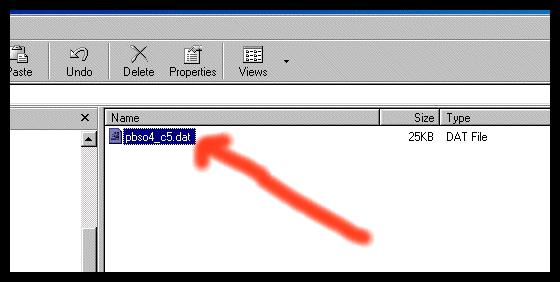
Sometimes you might have received an email containing an attachment with .Dat extension, and then you must have questioned yourself that “What is .Dat file”. Further you might have asked that how to excess this particular file. So, let’s have a look at solution to those frequent doubts. The very first thing that .Dat file indicates is that it contains some random data and it is not designed to be used by some specific applications. It means unlike the case of some frequently used file, let’s say seeing an XLS file one can easily say that it should be opened by Microsoft Excel, but in case of .Dat file you yourself have to decide that with which program you must open that file. It can be different programs at different times.
AskGif 3 min read
- 1.Dat files contain random data and are not tied to specific applications, requiring users to determine the appropriate program for opening them.
- 2These files often appear as email attachments, and their extensions may change during email routing, necessitating manual adjustments.
- 3To open a .Dat file, users can try using Notepad or the original application that created the file, or change its extension to the correct format.
AI-generated summary · May not capture all nuances
Key Insight
AskGif".Dat files contain random data and are not tied to specific applications, requiring users to determine the appropriate program for opening them."
— What is a .Dat file in windows?
🛒 You'll Need This
Products related to this article

Pantene
Pantene Collagen Conditioner | Damage Repair Conditioner Infused with Pro-V and Collagen
4.7
View priceBuy

Vaseline
VASELINE Cloud Soft, Light Moisturiser for Plump, Soft Skin, with Ceramides & Hyaluron Fillers, 10X Hydration Volume, Non-Sticky
4.7
View priceBuy
Aveeno Baby
Aveeno Baby Kids Curly Hair Conditioner With Oat Extract & Shea Butter, Gently Nourishes & Hydrates For Defined Curls, Tear-Free & Suitable For Sensitive Skin, Hypoallergenic, 12 Fl. Oz, 1 Count
4.7
View priceBuy
As an Amazon Associate, AskGif earns from qualifying purchases
Opening a .Dat file
The most appropriate way of opening a .Dat extension file is to utilize the same application which created it. In case of uncertainty one can try out with notepad. After opening the file with notepad one may recognize some part of the data, however most of the remaining part would be unrecognizable and most probably junk ejected by the source program.
These files are normally found in emails with attachments. However programs of these days do not produce any .Dat file and it is usually being used by programmers only.
To search “What is a dat file” initially you must inquire about the file from the sender that which application was used for its creation. If their response has a sense that it was just mere document or picture file with some other extensions, and they are not sure how it turned into a .Dat file, then it means file extension was changed during the email routing process.
Actually it may appear odd, but some email server programs change the extensions of attached to .Dat files automatically. Therefore if you were supposed to receive an image file, all you need to do is to change the extension of the file to JPG, PNG or GIP whichever you think would be more appropriate. A Microsoft word file should be changed to extension .Doc.
To change the file extension select Tools under File Options in windows explorer.
Then select the View tab and keep scrolling down until the option “Hide extensions for known file types” appears. Uncheck it to see the extension of all the files in that folder which you can change to something else.
All you need to do is right click over the file and change the extension which appears after the dot to any preferred format.
Finally, you must observe that change of icon of the file, representing the application which can open it. Like for an Excel sheet it should be an MS Excel icon.
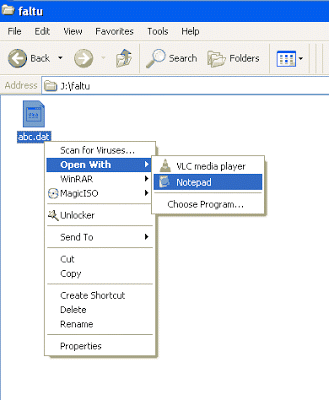
Now what should you do if you are still struggling finding the right source program or the extension of the original file? Go for a right click over the file and keep on selecting different programs through Open With option. It means if an XLS file is changed to .Dat file and you try to open it with MS Excel then it will work.
The above case was true because the file was created using an Excel application and all the data in it is appropriate, only the file extension has changed.
One can even go on trying for Windows media player as it would execute it if it happen to be some video file, any MP3 file or maybe any other file of similar nature. So using any of the above methods can bring an answer to your doubt that “What is a dat file”
Products related to: Opening a .Dat file
Amazon affiliate